Seven apps, built for the job. One platform gets the answers in.
Each app brings a builder, a response page and results made for one kind of request. Under all seven, one Request and Response Platform sends it, tracks who has answered, reminds only the people still out, and rolls the answers up. Learn it once; it works the same way in every app.
Built for the job, not a generic form.
A general form tool makes you build the ask from blank fields, then hands you a pile of answers to sort out. Each DataNAG app already knows the shape of its ask, so you fill in a few blanks and the answers come back as the thing you needed.
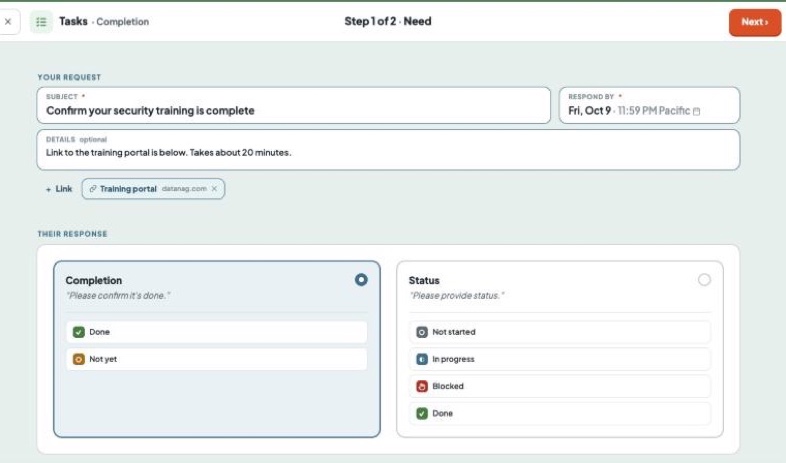
Say what you need, and by when.
The app knows the shape of the ask. Availability asks the way you would: propose times, or find the overlap. Tasks asks done or not yet. Sign-ups lays out the jobs and shifts. Thirty seconds for the simple case; the options are there when you want them.
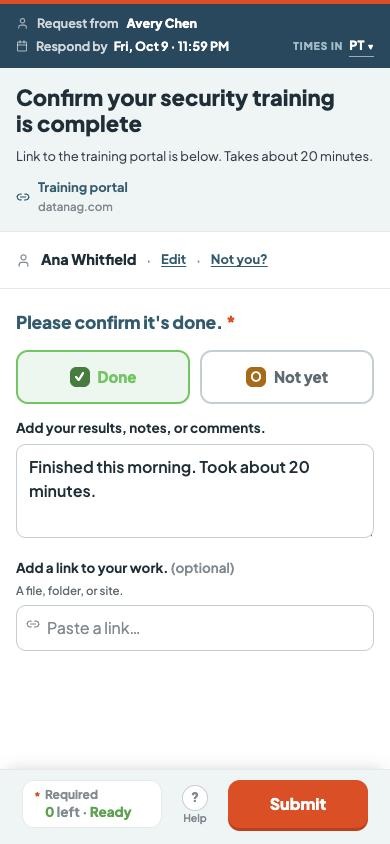
Easy to answer, so more people do.
Each page is built for its answer: tap a time, tap a status, pick a shift, paste a link, type your name to sign. Any phone, tablet or computer. No account, nothing to install, about a minute. Answers are checked as they go, so what comes back is clean.
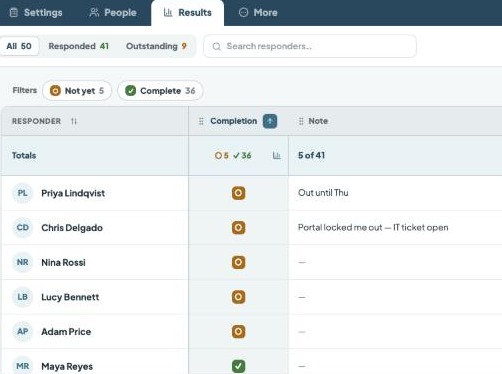
The answer, not a pile of answers.
Results take the shape of the ask: the best time on top, done or blocked, who took which shift, who has signed, one table with every row named. Open a person, or a column. You choose who sees what. Share a link, or download a spreadsheet.
The Request and Response Platform does the chasing.
Whatever the app, the same five steps run against your respond-by date. You set it up once; the platform carries it through.
Request
Send it your way. Share the link yourself, or put it on Autopilot and DataNAG emails the request for you.
Track
One hub per request shows who has answered, who opened and stalled, and who hasn’t looked.
Remind
Reminders go only to the people still out, on the schedule you set. Status reports come to your inbox.
Collect
Every answer lands checked and in one place, at the level of security you chose: open link, access code, or your list only.
Roll up
At the respond-by date the request closes, you get the final summary, and every answer sits in one clean table.
You need 50 people to confirm their security training by Friday.
One request with the Tasks app, through the five steps. Click a step.
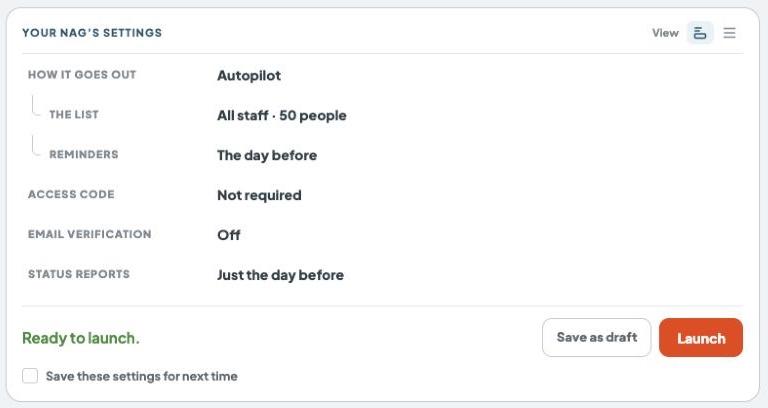
Say what you need, by when, and how it goes out.
Pick “Is it done?” in Tasks. The answer is already shaped: done or not yet, with a note. Set Friday as the respond-by date. Then choose how it goes out: share the link yourself by email or chat, or put it on Autopilot and DataNAG emails all 50, with a reminder the day before. Press Launch.
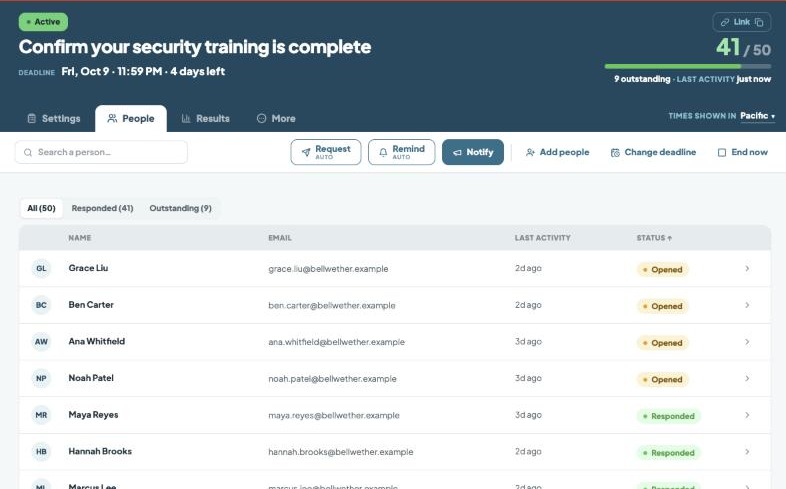
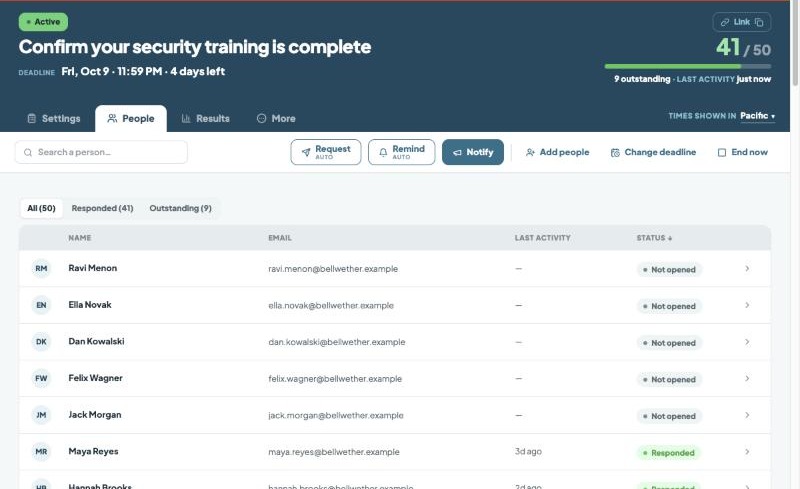
See where it stands without asking anyone.
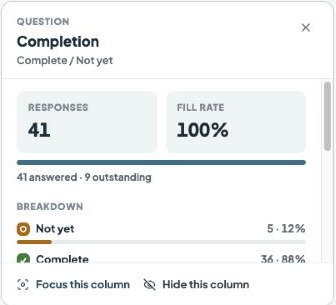
Every request has a hub. Midweek it shows 41 of 50 have answered, who opened and stalled, and who hasn’t looked. From here you can remind the rest, add people or move the date. Nothing to chase by hand.
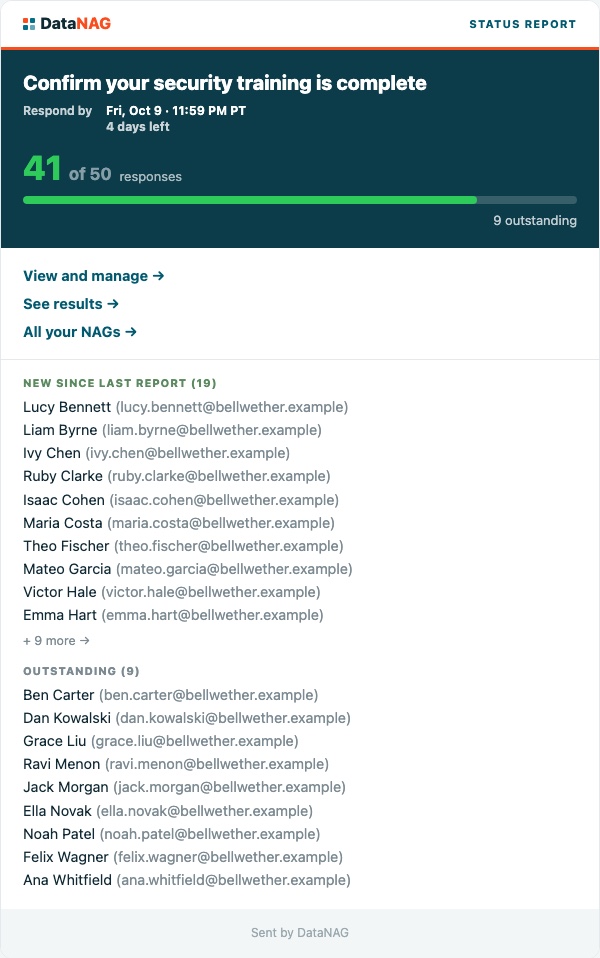
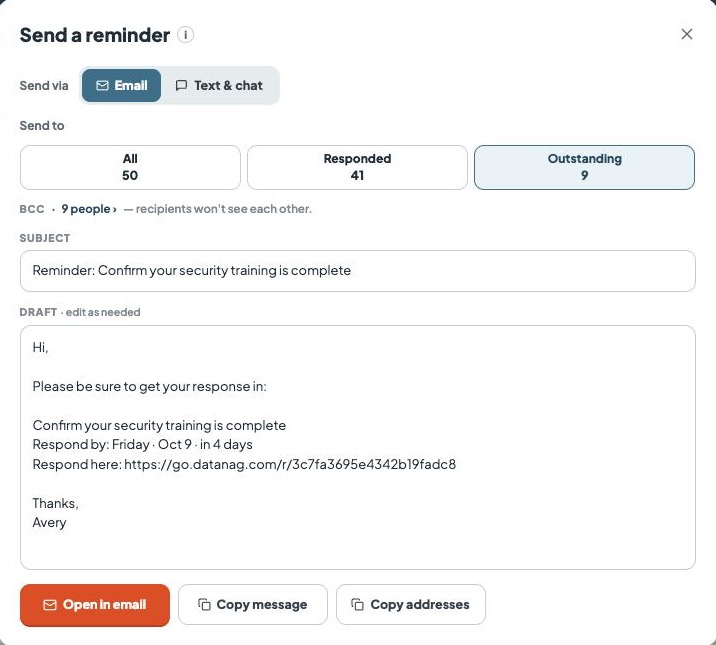
Only the people still out hear from you again.
On Autopilot, DataNAG emails the 9 who haven’t answered the day before, and never the 41 who have. Sending it yourself? DataNAG writes the reminder; you send it by email, text or chat. Either way a status report lands in your inbox: where it stands, who’s new since the last one, who’s still out.
Confirm your security training is complete
Avery Chen is requesting information from you.
Respond →Powered by DataNAGEasy to answer, so more people do.
Each person opens the link on any phone, tablet or computer. No account, nothing to install. Done or not yet, a note if they want, Submit. Answers are checked as they go. An access code, or your list only? That’s checked here too.
Friday comes. It closes itself.
At the respond-by time the request closes and the links go dark. The final summary lands in your inbox. Every answer is in one table: who’s done, who isn’t, what they said. Share it by link or download it.
That was one request. Now change the app.
The information changes. The process doesn’t.
Pick an app. The same five steps run, and its own results come in.
One request. One deadline.
Each one does part of the job.
| Built for the ask | Knows who hasn’t answered | Reminds only the rest | One table at the end | Same for every need | |
|---|---|---|---|---|---|
| Email and a spreadsheet | – | – | – | – | – |
| A pile of single-purpose toolsDoodle, SignUpGenius, a survey tool… | some | some | – | – | |
| A project or workflow systemeveryone joins, you pay per seat | – | – | – | ||
| Build your owna form plus automations, or an AI agent | you build it | you build it | you build it | you build it | – |
| DataNAG |
DataNAG does the whole job, the same way, for every kind of request.
Everything around the request.
Send it your way
Share link: you send it through your email, text, Slack, Teams or WhatsApp, and DataNAG writes every message for you to send. Autopilot: give DataNAG the list and it emails the request and every reminder. Same tracking, same results either way.
As secure as the ask needs
An open link for a quick question. An access code that travels with the link. Your list only, each person through a private link. A one-time code to confirm an address. You set the level per request. When it closes, the links go dark.
This request is protected
Enter the access code Avery sent you.
Your link is yours alone. No account needed.
Works with what you already use
Your people answer from the email or text they already got. For documents, they send a link to a file in Drive, Dropbox or SharePoint; DataNAG tracks the return, not the file. Results download to a spreadsheet. Nothing to install, nothing to connect. Your own subscription, not an IT project.
Easy for your people
Any phone, tablet or computer. No account, no app, no ads. About a minute. Answers go to you, not to a reply-all thread.
One subscription, seven apps
One login, one price, one way of working. Your people never pay and never need an account. Every trial includes all seven apps.
Take a test drive.
Build a request, send it to yourself, and watch the whole loop run. No card. The people you ask never need an account.